

Before you invest in long term local SEO services, you will want to perform a local SEO audit. A local SEO audit will analyze your main website as well as your Google Business Profile and directory listings to ensure there are no issues that are holding your back.
A local SEO audit can also uncover your current strengths and weaknesses. You need this data to inform your strategy and ensure you are not leaving any missed opportunities on the table.
How much does a local SEO audit cost?
A local SEO audit will cost between $1000 to $2000. That cost can go higher depending on the size and complexity of the audit. For example, businesses with multiple locations or large websites can take several weeks longer to complete and demand a higher price tag.
How long should a local SEO audit take?
A local SEO audit will take anywhere from 2 – 4 weeks to complete. That timeframe may need to be extended based on the factors mentioned above. You should consult with your SEO partner to get the most accurate estimate.
What is included in an SEO audit?
Performing a local SEO audit involves several steps to ensure your business’s online presence is optimized for local search.
Your audit should cover three main areas:
- Your main business website
- Your Google Business Profile
- Your online directory listings
These three areas are all connected and must work together to achieve the highest success with local SEO. Whether you plan to do your own local SEO audit or hire a partner to do it for you, make sure the audit covers the following bases:
Technical SEO Audit
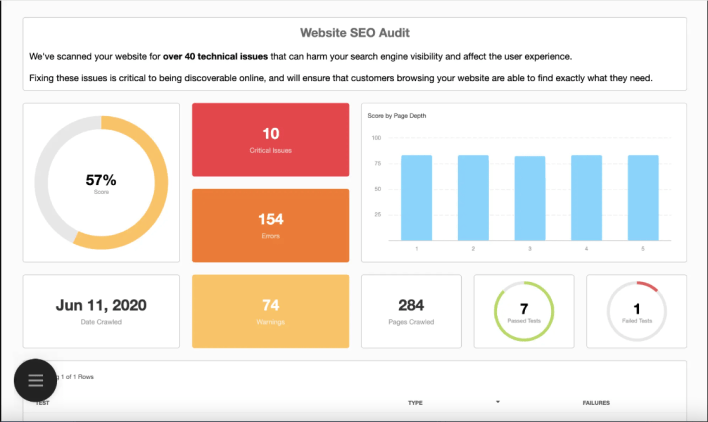
First things first, you need to make sure your website doesn’t have any technical issues that are holding it back. Perform a technical SEO audit to find and fix errors on the backend of your website. Here’s what you’ll want to do:
- Check your title tags, meta descriptions, and headings to ensure your website has been optimized for local search,
- Make sure your website can be easily crawled and indexed by inspecting the XML sitemap, Robots.txt files, website architecture, and internal linking structures.
- Verify there are no performance issues related to mobile-friendliness or page speed.
Checking for Google Penalties
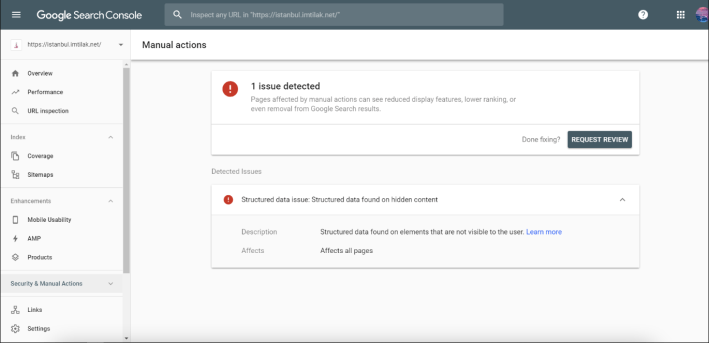
Sometimes Google will issue a penalty if it decides that your website is not up to par — and that makes it hard to rank for the keywords you want.
If you’ve been issued a penalty, you will be sent a notification in Google Search Console. To check for penalties, log in to Google Search Console and take the following steps:
- Check the “Manual Actions” section under the “Security & Manual Actions” tab. This section will display any manual penalties imposed by Google.
- Monitor the “Security Issues” section to identify any security-related issues detected on your website by Google, which could result in penalties.
- Check the “Mobile Usability” report to ensure that your website is mobile-friendly.
- Review the “Manual Actions History” to see a history of manual actions applied to your website by Google.
- Check the “Security Issues History” to view a history of security issues detected on your website by Google.
These notices will explain why the penalty was issued so you can fix the problem and avoid further penalties moving forward.
Competitor Analysis and Keyword Research
Once you’ve got the back end of your website in order and you’re on Google’s good side, you can start to look for growth opportunities.
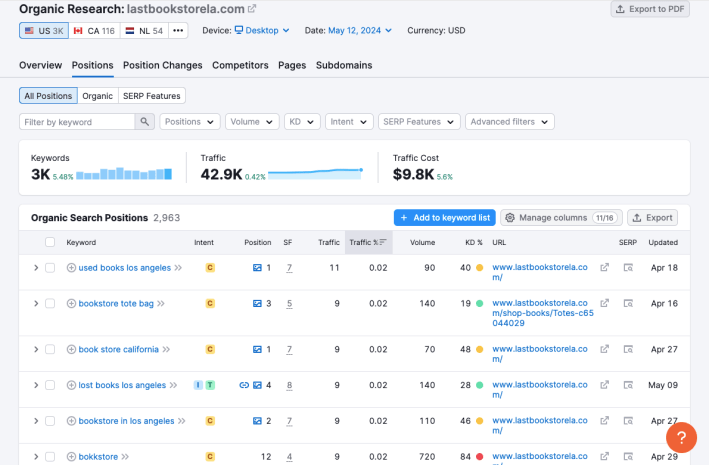
Use your keyword research tools to “spy” on your competitors and see what keywords they are ranking for. This will be your starting point.
You can also look for opportunities they have missed and find ways to capture that low hanging fruit.
- Use a keyword research tool like Semrush to spy on your competitors and see what keywords they are ranking for. Add those to your keyword list.
- Look for additional keywords that include location modifiers relevant to your business, such as city names, neighborhoods, or other local identifiers (e.g., “best dentist in Sherman Oaks”).
Keyword/SERP Audit
The next logical step is to see where your site currently ranks for the keywords you want to target.
The easiest way to do this is to type those search terms into Google and see if your site shows up. But search results can be skewed, so you’ll also want to use a tool like Semrush or Google Search Console to get more accurate information.
- Type the desired keyword into Google and see if your site shows up.
- Note the presence of other local businesses, directories, review sites, and other relevant entities that appear in the search results.
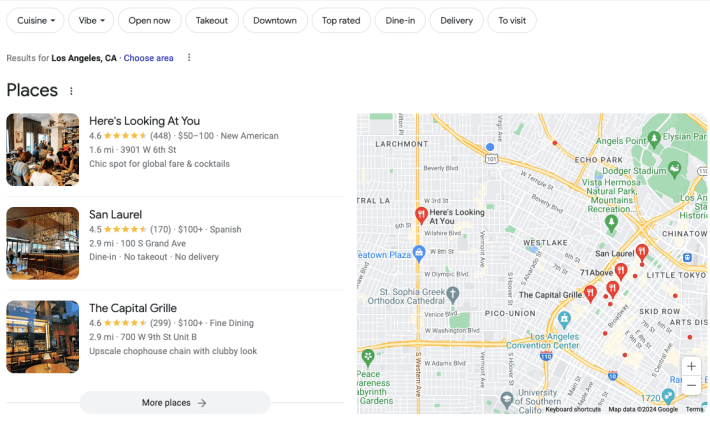
- Look at the types of results that appear, such as local map packs, organic listings, and featured snippets.
- Analyze the local map pack results that appear at the top of the SERP for location-based queries.
- Log in to Semrush and use the “Keyword Gap” tool to compare your domain with competitors.
Backlink Audit
When we talk about backlinks, we are talking about the links that are pointing back to your website. When another website links back to yours, that is called a backlink.
Backlinks are an important factor for SEO because Google considers these to be “recommendations.” But just like word of mouth, recommendations are only meaningful if there are alot of them coming from reputable sources
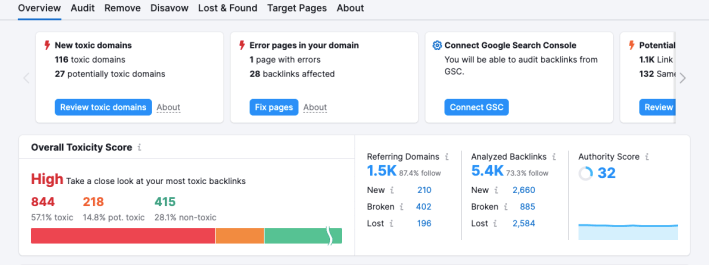
A large volume of spammy or irrelevant backlinks can actually hurt your reputation and make it harder to rank, so you’ll want to perform a backlink audit and disavow any toxic links that are making your site look bad.
- Use a tool like Google Search Console or Semrush to generate a list of all the backlinks pointing to your website.
- Assess the quality of each backlink by considering factors such as domain authority, relevance to your industry or location, and the trustworthiness of the linking website.
- Identify any toxic or harmful backlinks that could negatively impact your website’s SEO. These may include links from spammy or irrelevant websites, as well as links from websites with a poor reputation. Use Google’s Disavow Tool to request that Google ignores these links.
Citation Audit
Local citations are online mentions of a business’s name, address, and phone number (NAP) on various websites, directories, and platforms. They help search engines confirm important information about your business like your location and contact information.
Duplicate or inaccurate citations are confusing to both search engines and customers so it’s important to make sure these are accurate across all your listings.
- Use the Semrush Listings Management Tool to create a list of all the online citations for your business.
- Make sure the business’s NAP data is accurate across all citations.
- Identify and remove duplicate citations.

Google Business Profile Audit
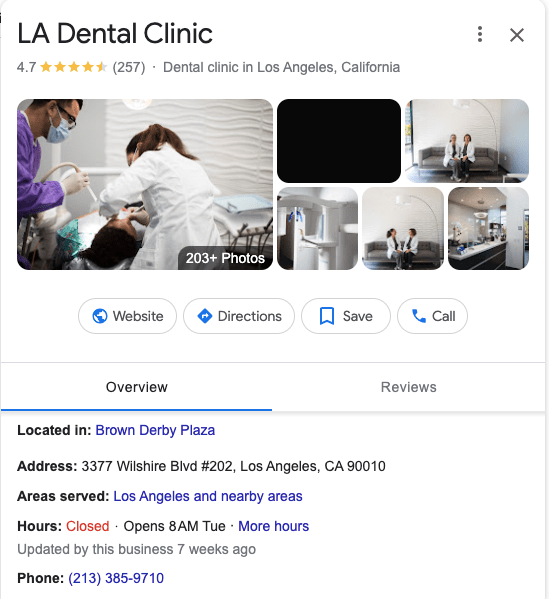
Your Google Business Profile is the centerpiece of your local SEO strategy so you need to make sure it is properly optimized and all the information is accurate.
If you don’t have your Google Business Profile set up yet, you can follow this checklist to get started.
If you do have your Google Business Profile already, you’ll want to give it a thorough review and methodically work through each element to ensure best practices are being followed.
- Verify that your Google Business Profile has been claimed. If not, do so now.
- Make sure that your business is categorized correctly.
- Ensure that the business info is accurate. This includes NAP data as well as the hours of operation.
- Confirm that the business description and services offered on your Google Business Profile are accurate. Optimize the business description with relevant keywords.
- Remove low-quality or irrelevant images and videos from your profile and add high-quality replacements.
Review Monitoring
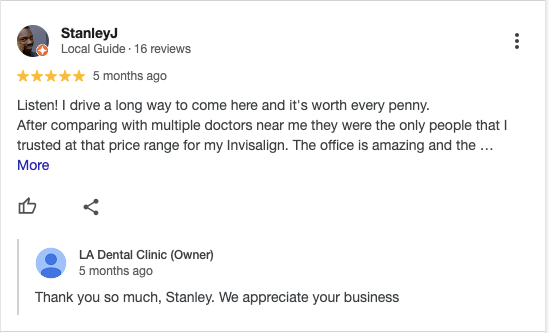
You already know that customer reviews are important to your local business. Naturally you’ll want to monitor your Google reviews and take steps to improve your rating.
- Monitor and respond to customer reviews on platforms like Google, Yelp, and Facebook.
- Encourage satisfied customers to leave positive reviews.
- Address any negative reviews promptly and professionally.
- Identify and report fake reviews
Google Maps Audit
In addition to Google Search Engine, Google Maps is also an important part of your local SEO strategy. In order to make sure that customers who are using Google Maps can find your business, you’ll want to take the following steps:
- Check the accuracy of your business NAP data, website URL, and business category, on Google Maps.
- Verify that the pin location on Google Maps is accurate
- If available, enable messaging and booking features on your Google Maps listing to make it easier for customers to contact or schedule appointments.
Boost Your Local Rankings In No Time
Local SEO is the best and most cost-effective way to attract local customers to your business. Contact me today and I’ll start you off with a local SEO audit and we can take it from there. Together, we’ll get you to the top of your local search results in no time!
 SEOstateof_mind