

It’s frustrating when you aren’t seeing the results you expected from local SEO — especially when you’ve been at it for a while.
But that doesn’t mean it isn’t working. You just need to turn up the juice or try some not-so-obvious tactics that your competitors aren’t doing.
It happens all the time. I see businesses jumping several positions in just a few weeks by making small tweaks to their local SEO strategy. That’s why I put together this list of advanced local SEO tips to help you get where you want to be. Enjoy!
Local SEO tips for your Google Business Profile
Your Google Business Profile is the centerpiece of your local SEO strategy, so I’ll start here. If you do nothing else for local SEO, you need to at least set up your Google Business Profile the right way.
Here are some tips to help you get the most value of your profile:
1. Fill out your Google Business Profile completely
You will notice that several of the fields in your Google Business Profile are optional. But even though you don’t have to fill them out, it’s better that you do.
Google rewards profiles that provide the most information. Start by adding in the most important details such as:
- Business name
- Business address
- Business phone number
- Link to business website
- Business categories
But don’t neglect the other fields. You want to move past the basic and fill out additional information such as:
- Description
- Services
- Photos/media
- Local posts
You really want to fill out your profile with as much information and content as possible. Not only will this help potential customers find you, it will keep them on your profile longer and make it seem more important than your competitor’s profiles.
2. Don’t go overboard when selecting categories
Categories is one of the most important fields that Google will use to display your profile in local search results. But with over 4,000 different choices, you might have trouble picking the right ones.
You must resist the temptation to select as many as possible. More is not better in this case. In fact, selecting too many secondary categories can hurt your relevance. Here’s what you need to do:
- Select only the most relevant category for your primary category. Some businesses have seen their profiles jump multiple spots simply from switching a secondary category to a primary category because it was the most relevant.
- Only select secondary categories that are relevant. You don’t have to fill all nine slots and doing so may be counterproductive.
- Use keywords to identify which categories are the most relevant. Simply type the keyword into Google, examine the results, and see what categories each competing business has selected.
Categories can have a direct impact on which searches your business appears for, so it’s important to choose carefully and avoid selecting categories that are only tangentially related to your business.
3. Collect longer, more descriptive reviews
It’s not enough to collect a ton of positive reviews. We now know that Google places greater value on longer, more descriptive reviews with 200+ characters.
This means you need to encourage customers to leave specific comments about what made their experience special. A simple “love this place!” just isn’t going to impress the Google overlord.
The example below will show you what kinds of reviews Google likes to see:
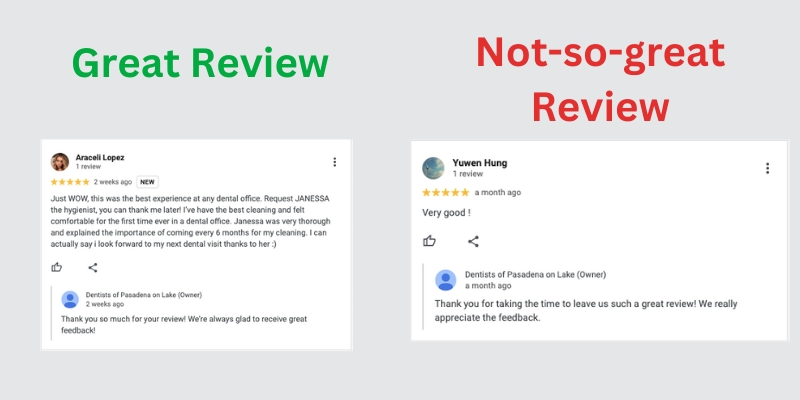
The more details your customers can provide the better. It comes down to providing content that is helpful to users. Simple comments like “this place is awesome!” just don’t give enough detailed information about why people enjoy your business.
You can also get bonus points if your customers upload their own photos. 😀
4. Add social media links
The last thing I want to mention about Google Business Profiles is that you should always connect it to your social media accounts.
There are a few main benefits to this:
- More social media activity sends positive signals to Google about the relevance and popularity of your business.
- It creates additional business citations that can boost your local SEO.
- It provides customers with additional social proof about your business.
- You can pull recent posts from your social media profiles into your Google Business Profile (see the example below).

It’s easy enough to add social media buttons to your Google Business Profile and there really are no drawbacks. I can’t think of a reason not to do this.
Local SEO tips for your business website
Your website is the other important asset for your local SEO strategy. You can’t rank on Google without a website, right?
But just having a website isn’t enough. You need to take the right steps to make sure search engines like your website and can find it easily. These tips will help get the most SEO value from your business website.
1. Do a competitor analysis
First things first. You need to do a local SEO audit and competitor analysis to find out what your main keywords should be. You don’t want to just pick keywords out of the air and put them on your website, you need to be more intentional than that.
A competitor analysis will tell you how your website compares to similar websites from competing businesses. It will give you the answers to many of your initial questions such as:
- Who are my SEO competitors?
- What keywords should I use?
- What topics should I cover?
- Where should I get backlinks from?
A competitor analysis is really the first thing you should do in terms of optimizing your website for local SEO. Without this data, you are basically just taking shots in the dark, so this is a good way to eliminate a lot of the guesswork and speed up your progress.
2. Create individual pages for each product or service
It’s easy to just list all of your different products or services on your homepage and call it a day, but this is bad for both your user experience (UX) and your local SEO.
Customers want more than just a list of products/services and so does Google. While it doesn’t hurt to list all of these items on a single page, you also need to create a dedicated page for each item.
For example, a dental practice can list all of its different services on the home page, but it would also want to create unique pages for dental implants, teeth whitening, clear braces, etc.
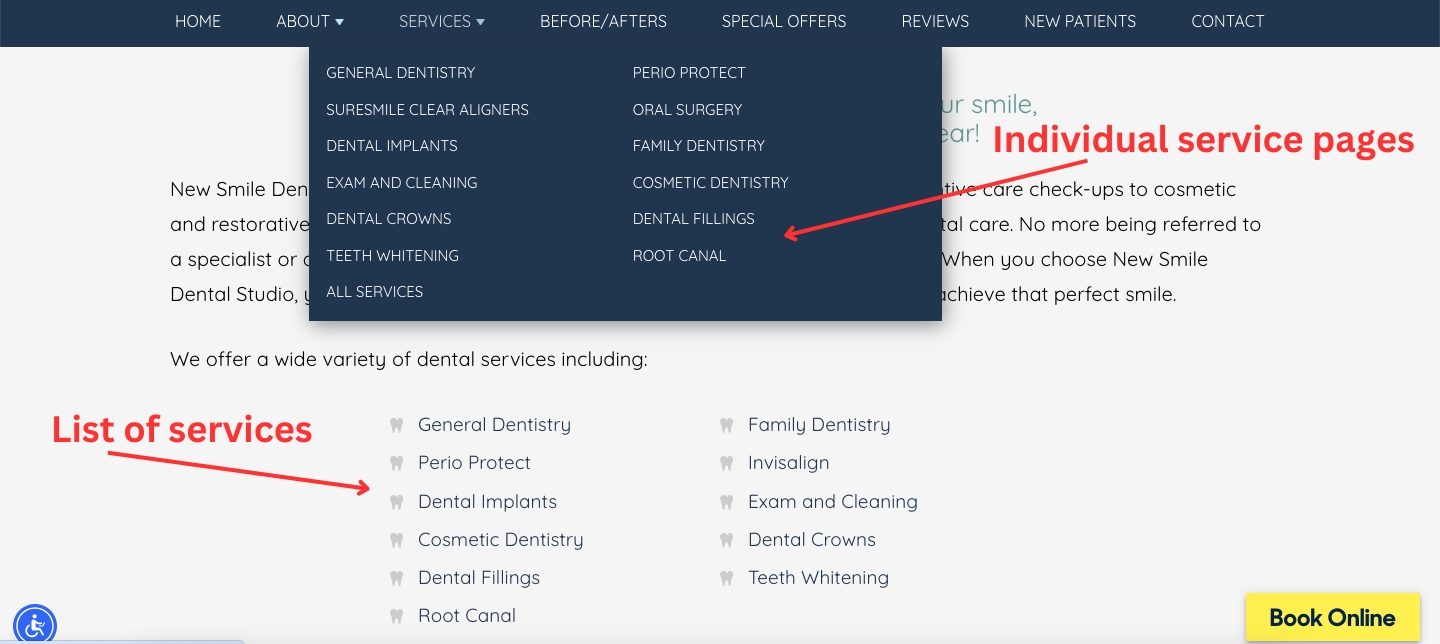
There are several reasons why this works:
- It makes it easy for customers and search engines to quickly understand what you offer and learn more
- It allows you to expand the number of keywords your website ranks for
- It creates more indexable pages and makes it easier for your site to be found
- It creates opportunities to improve your internal linking structure
Giving each of your products and services a dedicated page just makes sense, but I still see a lot of businesses that want to keep everything on a single page. Don’t do that.
3. Create individual pages for each location
I’ve mentioned this before but you need to create separate pages for each business location. Even if you only have one location, it is still helpful to have a location-specific page on your website in addition to your main home page.
Here is how you can build a location-specific page:
- Put the location in the URL. For example, http://www.mybusiness.com/location-name
- Fill it out with location-specific content. Make sure there is no duplicate content.
- Incorporate localized content such as “coffee shop in Downtown Los Angeles” and other similar phrases into your page title, meta description, headers, and body copy.
And here is an example of what a location-specific page should look like:

Location-specific pages help you attract targeted customers and increase your presence in local search results. It’s always a good idea to have a dedicated page for all of your business locations.
4. Use Schema Markup
If you don’t consider yourself an SEO expert, you probably aren’t familiar with Schema Markup. This is a type of structured data — or code — that helps search engines understand what your page is about.
I won’t go any farther into the technicalities behind Schema, but I will tell why it’s important for local SEO:
- It helps you show up for relevant searches
- It helps you win rich results like Featured Snippets and People Also Ask
- It helps you appear in local packs
- It gives you an advantage over competitors that aren’t using Schema
You will have to go into the backend of your website to access Schema and make changes to it. If you aren’t comfortable doing this, you will have to ask your local SEO consultant or web developer for help.
Take your Local SEO strategy to the next level
With a little bit of best practices and a little bit of outside-of-the-box thinking, it’s entirely possible for you to see the local SEO results you are hoping for. But if you’re feeling stuck and want some outside help, don’t hesitate to hire a local SEO consultant to help you get to the next level.
Contact me today and I’ll start you off with a competitor analysis and SEO audit to get things started. If you like what you hear, we can dive deeper into the strategy and create a proper scope of work.
 SEOstateof_mind